> ## Documentation Index
> Fetch the complete documentation index at: https://sen-0597ab10.mintlify.site/llms.txt
> Use this file to discover all available pages before exploring further.
# CSV
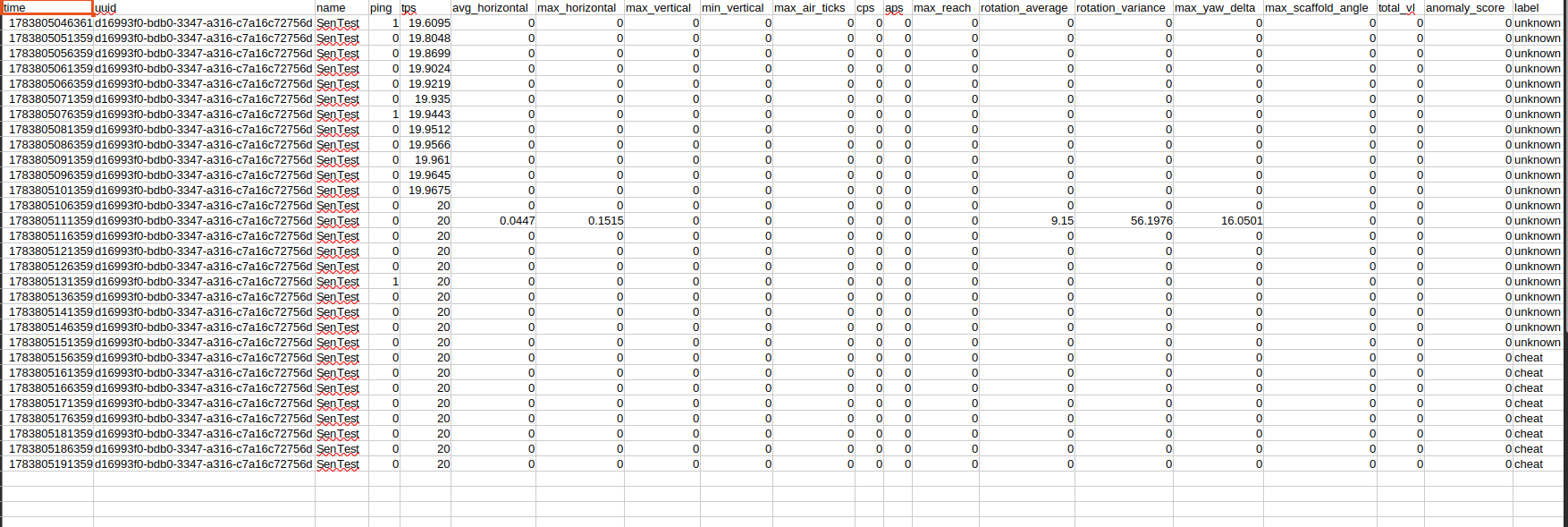
| Column | Type/unit | Description |
| -------------------- | -------------------------- | ------------------------------------------------------------------------------------------------------------------------------------------------------------------------- |
| `time` | Unix epoch milliseconds | Time when the sample window was completed. This is UTC-based machine time, not formatted local time. |
| `uuid` | UUID | Permanent Minecraft UUID of the sampled player. Use this instead of the name when joining data across name changes. |
| `name` | Text | Player name at the time of the sample. |
| `ping` | Milliseconds | Player ping reported by the server when the sample was created. High ping can explain some unusual movement or combat values. |
| `tps` | Ticks per second | Server TPS at sample time, using the first Paper TPS average. Values significantly below 20 indicate server lag. |
| `avg_horizontal` | Blocks per movement event | Average X/Z movement distance across movement events in the sample window. |
| `max_horizontal` | Blocks per movement event | Largest single X/Z movement distance observed in the window. |
| `max_vertical` | Blocks per movement event | Largest upward Y change observed in the window. |
| `min_vertical` | Blocks per movement event | Most-negative/downward Y change observed in the window. |
| `max_air_ticks` | Movement samples | Longest consecutive sequence where the block directly below the player was not solid. Despite the name, this follows movement events rather than guaranteed server ticks. |
| `cps` | Clicks per second | Arm-swing animations divided by `sample-seconds`. This includes swings that do not hit an entity. |
| `aps` | Attacks per second | Successful, non-cancelled player damage events divided by `sample-seconds`. |
| `max_reach` | Blocks | Largest eye-to-nearest-hitbox distance measured for a successful attack in the window. Reach hitbox leniency is included. |
| `rotation_average` | Degrees per movement event | Average combined yaw and pitch change observed in the sample window. |
| `rotation_variance` | Squared degree variance | Variation in combined rotation magnitude. Very low variance with meaningful rotation can indicate automated input, but can also occur during simple tracking. |
| `max_yaw_delta` | Degrees | Largest wrapped yaw change between consecutive movement events. |
| `max_scaffold_angle` | Degrees | Largest angle between the player's view and an underfoot block placement included in scaffold sampling. `0` means no qualifying placement was sampled. |
| `total_vl` | Violation level | Sum of the player's current VL across all standard Anticheat checks at sample time. |
| `anomaly_score` | Weighted score | Combined behavior score calculated from configured thresholds and weights. This is not a percentage or proof of cheating. |
| `label` | Text | Staff-assigned classification at sample time: `legit`, `suspect`, `cheat`, or `unknown`. |
CSV values are written with 4 decimal places where appropriate.
## Example CSV rows
 ## Storage and Retention
Behaviour samples currently have no automatic age or row-count retention limit. Both `behaviour.db` and `behaviour-data.csv` grow as samples are collected. Admins should monitor disk usage and establish a retention policy appropriate for their player count.
Recommended maintanace:
1. Stop the server before making a complete backup of the behaviour folder.
2. Backup `behaviour.db` together with any `behaviour,db-wal` and `behaviour.db-shm` files if the server was not stopped correctly
3. Archive `behaviour-data.csv` if it becomes too large. The plugin creates a new file and header when the configured CSV file does not exist.
4. Do not delete WAL/SHM files when the server is running
5. Keep database and CSV data private because it containes UUIDs, player names, activity measurments and staff classifications.
## Resetting Behaviour Data
To reset all behaviour samples and labels safely:
1. Stop the server
2. Backup `plugins/SMP/Anticheat/Behaviour/` if data may be needed later
3. Delete the entire Behaviour folder
4. Start the server. The plugin recreates the folder, database schema, and CSV when the new samples are written.
Deleting only `behaviour-data.csv` resets only the export.
## Storage and Retention
Behaviour samples currently have no automatic age or row-count retention limit. Both `behaviour.db` and `behaviour-data.csv` grow as samples are collected. Admins should monitor disk usage and establish a retention policy appropriate for their player count.
Recommended maintanace:
1. Stop the server before making a complete backup of the behaviour folder.
2. Backup `behaviour.db` together with any `behaviour,db-wal` and `behaviour.db-shm` files if the server was not stopped correctly
3. Archive `behaviour-data.csv` if it becomes too large. The plugin creates a new file and header when the configured CSV file does not exist.
4. Do not delete WAL/SHM files when the server is running
5. Keep database and CSV data private because it containes UUIDs, player names, activity measurments and staff classifications.
## Resetting Behaviour Data
To reset all behaviour samples and labels safely:
1. Stop the server
2. Backup `plugins/SMP/Anticheat/Behaviour/` if data may be needed later
3. Delete the entire Behaviour folder
4. Start the server. The plugin recreates the folder, database schema, and CSV when the new samples are written.
Deleting only `behaviour-data.csv` resets only the export.
Deleting only `behaviour.db` removes persistent samples and labels but leaves the old CSV history, so the 2 files will no longer represent the same time range.
## Disabling the Behaviour Profiler
Set:
```yml theme={null}
behavior-profiler:
enabled: false
```
Then run `/anticheat reload` or restart the server. Existing files are preserved and no new behaviour samples are collected when disabled. Standard movement, combat, block, and packet checks continue working. Only behaviour profiling and `BehaviourAnomaly` scoring stop.